What Is The Exact Difference Between A Web Application And A Standard Website?
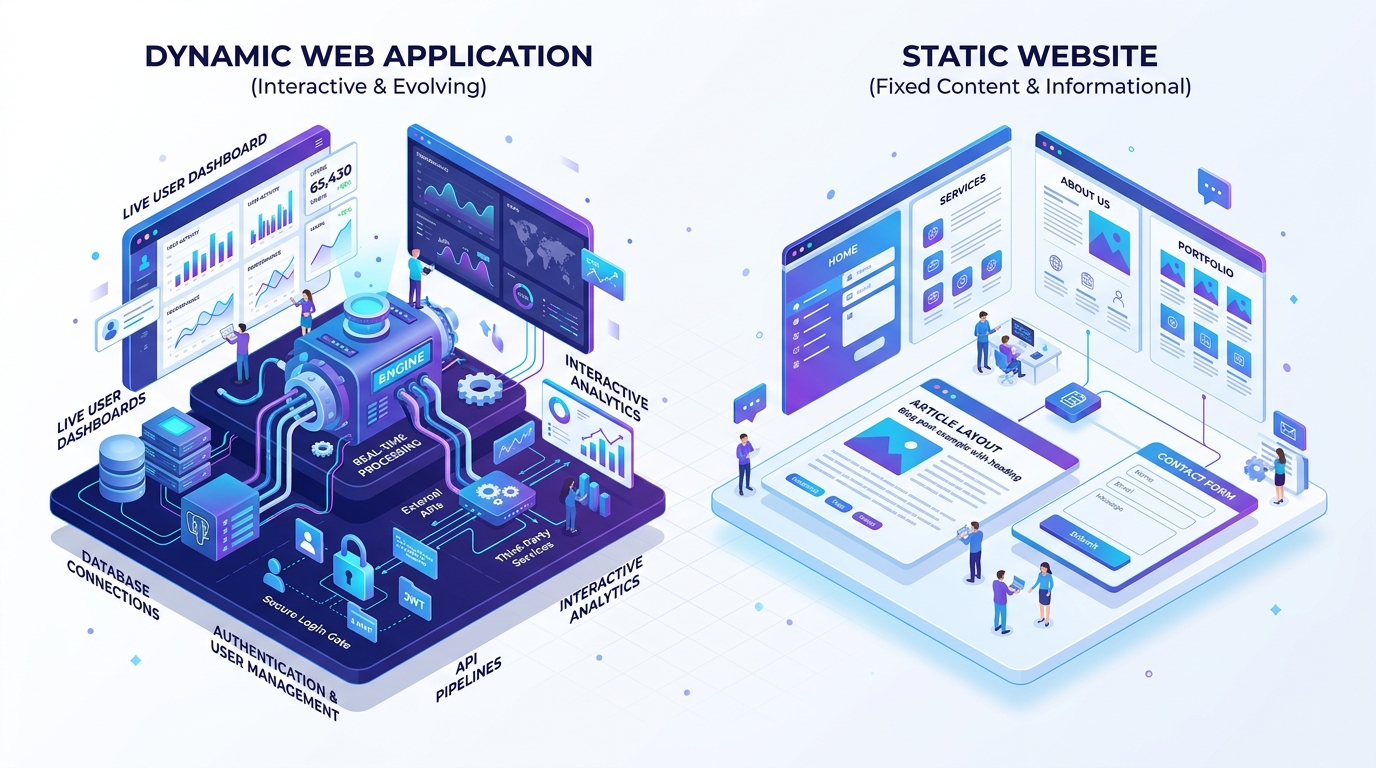
Confusing a web application with a website is like confusing a Tesla factory with a printed brochure.
Both can be viewed in a web browser. Both use HTML, CSS, and images. But while one is designed to present static information for humans to read, the other is a complex software machine that processes data, executes proprietary business logic, and conducts transactions.
Understanding the difference between a web application and a standard website is essential when budgeting your digital strategy and scoping your engineering needs.
Here is the exact technical and business distinction.
The Executive TL;DR / Quick Architectural Contrast
- Standard Website: Content-focused, largely static or CMS-driven (WordPress/static HTML), one-way communication (user reads information), simple contact forms, low complexity ($2,000–$10,000).
- Web Application: Logic-focused, highly dynamic and interactive, two-way data exchange (user creates, modifies, and processes data), authenticated user accounts, API integrations, high complexity ($20,000–$150,000+).
- The Interactivity Rule: If users visit primarily to consume information, it is a website. If users visit to perform automated tasks, conduct transactions, or manipulate data, it is a web application.
What Is the Exact Difference Between a Web Application and a Website?
The difference lies in user interactivity and data manipulation. A website is informational, delivering static or semi-static content to the visitor (such as blogs, portfolios, and marketing pages). A web application is an interactive software program executed in the browser that performs dynamic business logic, manages authenticated user sessions, and processes database operations.
Websites inform. Web applications perform.
The Technical Anatomy: How They Differ Under the Hood
Let us examine the mechanical differences between these two digital formats.
1. State Management and User Authentication
A standard website treats visitors anonymously; whether you visit from London or Tokyo, you view the same home page. A web application relies on complex state management: users log in, manage role permissions, and view customized dashboards populated with their private transactional records. Discover our custom software development services.
2. Complex Business Logic and Backend Compute
Websites primarily fetch pre-rendered HTML or basic database articles. Web applications execute complex workflows: calculating insurance quotes, converting file formats, running background queues, or processing payment split disbursements via Stripe.
3. Integration Surface Area
Websites rarely connect to anything beyond Google Analytics and a contact form emailer. Web applications integrate deeply with ERP systems, CRM pipelines, payment gateways, and custom REST/GraphQL APIs. Review our engineering process.
Feature Comparison Matrix
| Capability / Attribute | Standard Website | Dynamic Web Application |
|---|---|---|
| Primary Purpose | Displaying marketing copy & information | Executing tasks, workflows & data processing |
| User Interaction | Passive reading, scrolling & form submission | Active manipulation, filtering, editing & creating |
| Authentication Requirement | Rare (Only for site admin/editors) | Essential (Customer logins, RBAC permissions) |
| Database Complexity | Simple content tables (posts, pages, tags) | Complex relational schemas with foreign keys |
| Development Timeframe | 2 to 4 Weeks | 8 to 24+ Weeks |
| Maintenance Demands | Basic security updates & content refreshes | High telemetry monitoring, API testing & bug triage |
Step-by-Step Decision: Which Does Your Business Need?
Follow this simple evaluation framework:
- Evaluate Your Core Customer Goal
If your customer needs to know who you are, what you charge, and how to call your office, build a modern, high-converting marketing website.
- Identify Opportunities for Workflow Automation
If your staff spends 20 hours a week answering emails to calculate quotes, intake client documents, or schedule appointments, build a custom web application portal to automate that human labor. Explore our client builds on our work page.
- Check Your Long-Term Product Vision
If you plan to charge subscription fees or build a SaaS business model, you are building a custom web application. Review our transparent pricing options to plan your budget.
The Non-Obvious Pitfall: Forcing a Website CMS into a Web Application
The most common failure in web development is trying to force a standard website CMS like WordPress into acting like a complex web application.
Founders install 45 plugins to manage user accounts, custom databases, and workflow logic.
Within three months, database queries take 12 seconds to load, plugin updates crash the checkout system, and security vulnerabilities multiply. If your product requires dynamic data manipulation, build it on a native application framework like Laravel or Node.js from day one.
Build the Right Digital Solution for Your Business
Do not waste capital building the wrong tool. Take decisive action:
- Write down whether your primary goal is marketing awareness or operational task automation.
- Reach out to App Craft Services for an objective consultation to determine whether a custom web application or optimized web portal best fits your objectives.
Engineering tailored to your purpose.